
ModuleNotFoundError: No Module Named pkg_resources: Causes and Fixes
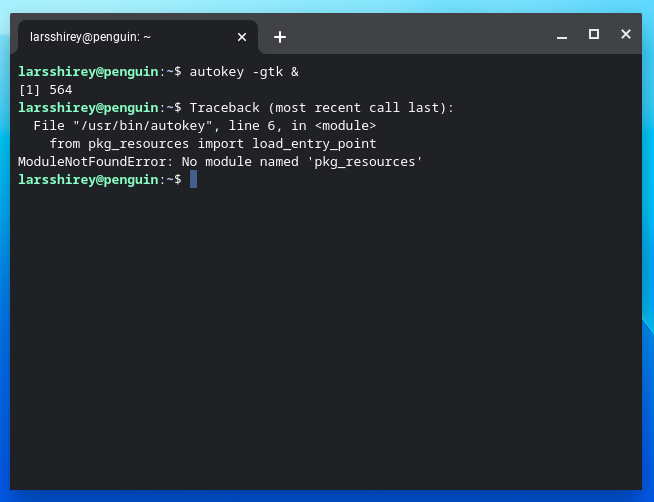
The Python error ModuleNotFoundError: No module named 'pkg_resources' commonly appears when an application or dependency tries to import pkg_resources, but the active Python environment does not provide it. A major reason in 2026 is that Setuptools 82.0.0 removed pkg_resources. The module had already been deprecated, and current Setuptools releases no longer bundle it.
The correct fix depends on whether you maintain the code that imports pkg_resources or are trying to run an older third-party package. Installing packages into a different Python interpreter from the one running your script is another common cause of the same error.
Why Did pkg_resources Disappear?
pkg_resources was historically distributed as part of Setuptools and provided APIs for package metadata, entry points, version checks and resource access. Setuptools deprecated it in version 67.5.0 because of architectural and performance limitations. In Setuptools 82.0.0, released on 8 February 2026, it was removed from distributions.
The official Setuptools pkg_resources documentation records its deprecation and removal. The Setuptools changelog identifies version 82.0.0 and the removal date.
Step 1: Check Which Python Environment Is Running
First confirm which interpreter and package installer are being used. Run:
python --version
python -m pip --version
python -m pip show setuptools
On systems where the command is python3, use:
python3 --version
python3 -m pip --version
python3 -m pip show setuptools
Using python -m pip helps ensure that pip operates on the interpreter named by python. If you use a virtual environment, activate it before running these commands. Do not assume that installing a package globally will fix an application running inside a separate environment.
Step 2: Temporary Compatibility Fix for Legacy Packages
If an old package still imports pkg_resources and you cannot update it immediately, a temporary workaround is to install a compatible Setuptools version that still contains the module. For example:
python -m pip install "setuptools<82"Then verify the import:
python -c "import pkg_resources; print(pkg_resources.__file__)"This is a compatibility workaround, not the preferred long-term solution. Pinning an older dependency can affect other packages and may leave you without later fixes. Use it only after checking the project’s dependency requirements, and record the pin in the environment configuration so deployments remain reproducible.
Step 3: Upgrade the Package That Uses pkg_resources
Find which dependency imports the missing module. The traceback normally shows the file and package that tried to import it. Check whether the project has a newer release that no longer relies on pkg_resources. Upgrade the affected package and its related dependencies within a test environment:
python -m pip install --upgrade package-nameReplace package-name with the actual dependency shown in your traceback. Avoid blindly upgrading every package in a production environment. Review release notes and run your tests after changing dependency versions.
Step 4: Replace pkg_resources in Your Own Code
For package resource access, Python’s standard library provides importlib.resources. For distribution metadata and entry-point discovery, use importlib.metadata.
Replace Resource Access
Older code may use pkg_resources.resource_filename() or related resource APIs. A modern approach is:
from importlib.resources import files

resource = files("your_package").joinpath("data", "example.txt")
text = resource.read_text(encoding="utf-8")
Replace your_package with the package that contains the resource. For code that needs a temporary filesystem path, use as_file() as documented by Python.
Replace Package Version Checks
Instead of asking pkg_resources for a distribution version, use:
from importlib.metadata import version, PackageNotFoundError

try:
    installed_version = version("requests")
except PackageNotFoundError:
    installed_version = None

print(installed_version)
This reads installed distribution metadata. The distribution name is not always identical to the import name, so use the package’s documented distribution name.
Replace Entry-Point Discovery
For entry-point plugins, Python’s standard library provides:
from importlib.metadata import entry_points

plugins = entry_points(group="my_application.plugins")
for plugin in plugins:
    print(plugin.name, plugin.value)
Check the Python version supported by your project and the exact API appropriate to that version.
Step 5: Rebuild a Clean Virtual Environment
If package installation history is inconsistent, create a fresh environment and reinstall the project’s declared dependencies:
python -m venv .venv

# Windows
.venv\Scripts\activate

# macOS or Linux
source .venv/bin/activate

python -m pip install --upgrade pip
python -m pip install -r requirements.txt
Then run the application again. A clean environment helps reveal missing or incorrectly declared dependencies and prevents unrelated system packages from masking the problem.
Common Mistakes to Avoid
- Running
pip installfrom a different interpreter than the one executing the application. - Assuming that installing the latest Setuptools restores
pkg_resources; version 82 and later removed it. - Editing code inside a third-party package without checking for an upstream update.
- Downgrading Setuptools permanently without documenting and testing the compatibility constraint.
- Replacing
pkg_resourcesimports with unrelated APIs without matching the original behaviour.
Frequently Asked Questions
Is pkg_resources still included in Setuptools?
No. Setuptools removed it in version 82.0.0, released in February 2026. It was deprecated earlier.
Will installing setuptools fix the error?
Installing the latest Setuptools will not restore the removed module. A temporary compatibility pin below version 82 may help legacy software, while the preferred fix is to update the dependency or migrate the code.
What should I use instead of pkg_resources?
Use importlib.resources for package resources and importlib.metadata for distribution metadata and entry points.
Why does the error happen only in one virtual environment?
Different environments can contain different package versions. Check the interpreter and Setuptools version from the environment where the failing command actually runs.
Conclusion
The ModuleNotFoundError for pkg_resources is often caused by legacy code encountering Setuptools 82 or a mismatched Python environment. Verify the interpreter, update the dependency where possible and migrate your own code to importlib.resources or importlib.metadata. A temporary setuptools<82 pin can restore compatibility for older packages, but it should be treated as a short-term measure.

Emily Carter is a writer who enjoys covering the entertainment world, from celebrities and movies to television and pop culture. She focuses on making stories interesting, relatable, and easy to follow.